Submit an Idea / Project Request

Body

Idea/Project requests are potential projects that are being evaluated. If approved, they will transition into an official project.  

An Idea/Project request must be submitted from the IT Support Center.  This ensures that the appropriate data fields are captured and workflow processes are followed. Once an idea/project is submitted, it will be managed throughout the evaluation process.   For more information, please contact pmo@utrgv.edu.

Submit a new Idea/Project request for evaluation by following the instructions below:

  1. Click on the Request Service button.

Idea/Project Request service page with the Request Service button displayed. 
 

  1. The initial form displayed must be filled out and saved.
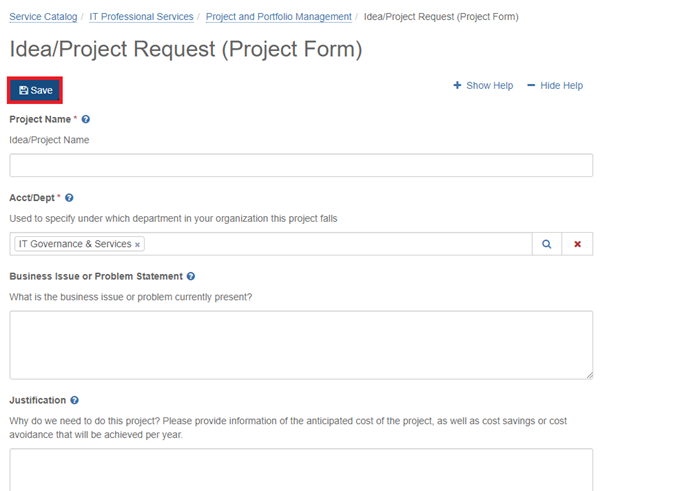
Idea/Project Request form showing required fields and the Save button.
 

  1. After the initial form is completed and saved, the following screen will become available. To complete the submission of the request, you must click on “Review and submit this request” 

Confirmation screen indicating the request was created successfully.
 

  1. Click on “Mark Complete and Submit”.

    Request details page showing the Mark Complete and Submit button available.
  2. On the pop-up, click on “Mark Complete and Submit”.

    Confirmation dialog listing incomplete sections with options to Mark Complete and Submit or Cancel.
     
  3. Request is now submitted successfully and option to view the request is available.

    Confirmation message indicating the request was submitted successfully with a link to View the request you just submitted.
  4. Following the submission of the request, its status can be tracked via Services > Project Request. It is important to note that the project request will only remain in this view while the request is being evaluated. Assuming the request is approved and converted to a project, the request will no longer appear in this area. It will then appear under the main "Projects" menu. Please note that depending on visibility settings or project membership, the project may not be visible to all users. 
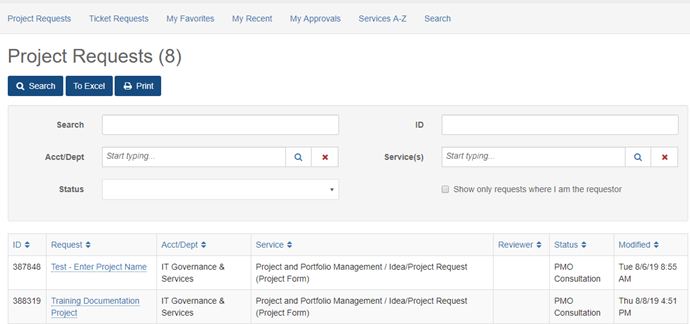
Project Requests list showing submitted requests with search and filter options.

Details

Details

Article ID: 88814
Created
Wed 10/9/19 11:06 AM
Modified
Thu 3/26/26 4:19 PM

Related Services / Offerings

Related Services / Offerings (2)

Requests to solve a business issue or create a project request, such as for software implementation, upgrades to existing applications and IT infrastructure, and new IT developments.
Obtain authorization for the use of software not listed as permissible at UTRGV. If you plan to purchase software, follow the Software Assessment process before using university funds.

Attachments

png

idea1.png  · 127 KB Computer

Wed 10/9/19 10:25 AM
PNG

idea2.PNG  · 67 KB Computer

Wed 10/9/19 10:25 AM
png

idea3.png  · 91 KB Computer

Wed 10/9/19 10:25 AM
png

idea4a.png  · 74 KB Computer

Wed 10/9/19 10:25 AM
png

idea5.png  · 75 KB Computer

Wed 10/9/19 10:25 AM
png

idea6a.png  · 69 KB Computer

Wed 10/9/19 10:25 AM
png

idea6b.png  · 69 KB Computer

Wed 10/9/19 10:25 AM
png

idea7.png  · 77 KB Computer

Wed 10/9/19 10:25 AM
;