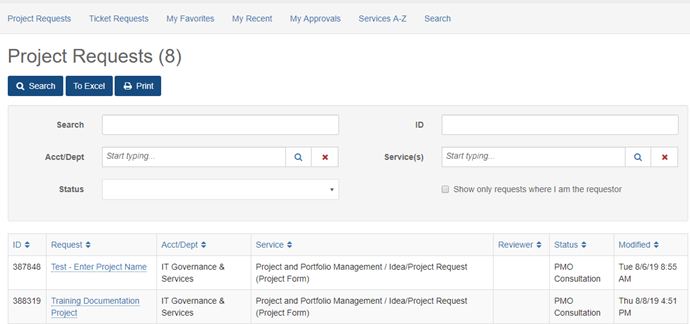
Idea/Project requests are potential projects that are being evaluated. If approved, they will transition into an official project.
An Idea/Project request must be submitted from the IT Support Center. This ensures that the appropriate data fields are captured and workflow processes are followed. Once an idea/project is submitted, it will be managed throughout the evaluation process. For more information, please contact pmo@utrgv.edu.
Submit a new Idea/Project request for evaluation by following the instructions below:
- Click on the Request Service button.

- The initial form displayed must be filled out and saved.
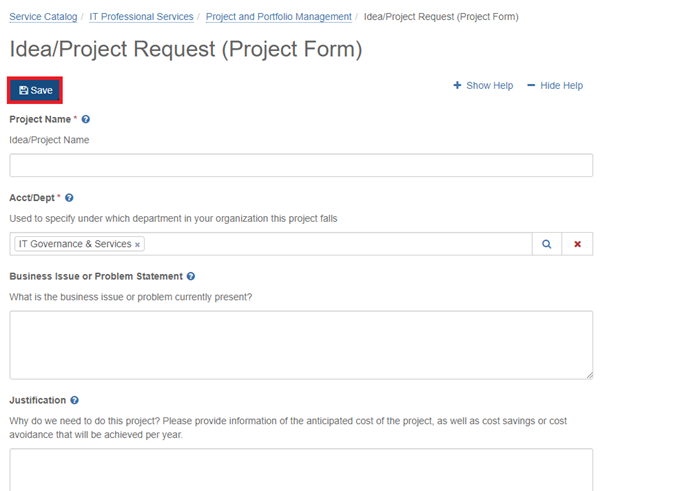
- After the initial form is completed and saved, the following screen will become available. To complete the submission of the request, you must click on “Review and submit this request”

- Click on “Mark Complete and Submit”.

- On the pop-up, click on “Mark Complete and Submit”.

- Request is now submitted successfully and option to view the request is available.

- Following the submission of the request, its status can be tracked via Services > Project Request. It is important to note that the project request will only remain in this view while the request is being evaluated. Assuming the request is approved and converted to a project, the request will no longer appear in this area. It will then appear under the main "Projects" menu. Please note that depending on visibility settings or project membership, the project may not be visible to all users.